

[家居電腦維修]電腦開機顯示CMOS Date Time Not Set, 及進入windows後藍色熒幕

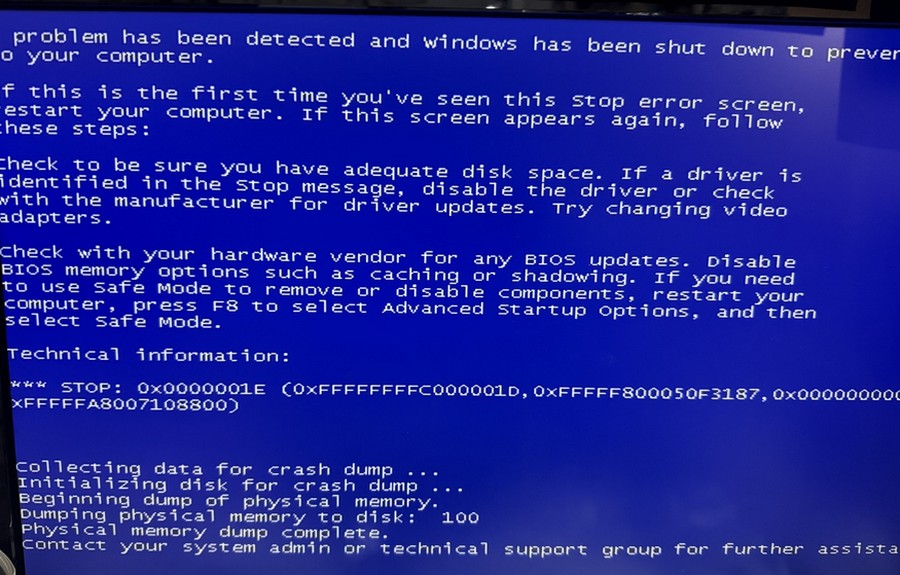
藍屏顯示:;
A problem has been detected and windows has been shut down to prever
to your computer.
If this is the first time you’ve seen this stop error screen,
restart your computer. If this screen appears again, follow
these steps:
check to be sure you have adequate disk space. If a driver is
identified in the stop_message, disable the driver or check
with the manufacturer for driver updates. Try changing video
adapters.
check with your hardware vendor for any BIOS updates. Disable
BIOS memory options such as caching or shadowing. If you need
to use safe Mode to remove or disable components, restart your
computer, press F8 to select Advanced Startup options, and then
select safe Mode.
Technical information:
* STOP: 0x0000001E (0XFFFFFFFFC000001D, 0xFFFFF800050F3187, 0x000000000
XFFFFFA8007108800)
collecting data for crash dump
Initializing disk for crash dump
Beginning dump of physical memory.
Dumping physical memory to disk: 100
Physical memory dump complete.
Contact your system admin or technical support group for further assista
問題:
電腦開機顯示CMOS Date Time Not Set, 及進入windows後藍色熒幕;
解決方法
藍屏原因一般是Ram 問題, 所以嘗試移走其中一條Ram 再做開機測試後是正常的;
1.而 Cmos Date/Time Not Set, 原因是電腦底板的電池 CR2032 沒有電, 更換後進入windows 再修改電腦時間就沒有問題;
